
The difference between a v1 and v2 token is that there are several claims not present in v1 that are present in v2. It is important when creating an Application Principal (Application Registration or App Reg) that you configure the right settings. Below, we will explain what to look out for.
What is the difference between oAuth token v1 and v2?
Signing and Security
With oAuth 1.0, every request you send to a server must be cryptographically signed. This means you create a digital signature using a secret key (client secret) and other parameters. This signature is sent along with the request so the server can verify that the request is truly from you and hasn’t been tampered with during transmission. Because of this, OAuth 1.0 is theoretically more secure, even if you don’t use an encrypted HTTPS connection—although HTTPS is still strongly recommended.
With OAuth 2.0, things work differently. There is no signature for each request. Instead, you use what’s called a Bearer token, which is like an access ticket you include with every request—usually via the HTTP header (Authorization: Bearer <token>). The server trusts that you have received this token securely. Since the token is sent without additional security per request, using a secure HTTPS connection is absolutely necessary with OAuth 2.0 to prevent token interception.
Summary:
- OAuth 1.0 is more secure at the protocol level but more difficult to implement due to the complex signature process.
- OAuth 2.0 is simpler and more flexible but relies entirely on HTTPS for security.
Implementation in App Registration
For many, this will sound familiar: by default, a v1 App Registration is created when using Entra ID (formerly Azure AD). To avoid this and ensure v2 is used when generating access tokens—so that JWT validation works correctly in services like Azure API Management—you need to update the App Manifest accordingly.
Below are the steps you should follow to ensure that v2 tokens are used..
1) Navigate to the new created App Registration
2) In the left menu, go to Manifest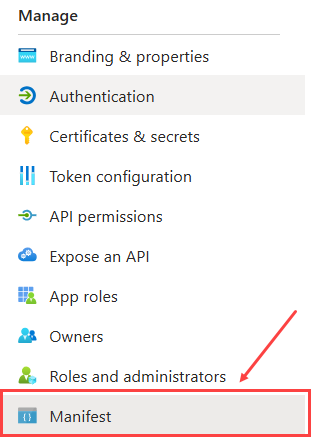
3) Then you have two options, or you use the new Microsoft Graph App Manifest (New) or the AAD Graph App Manifest (Deprecating Soon) in this step we are choosing the first one.
4) Search then for requestedAccessTokenVersion in the API section and change null to 2
5) Save the App Reg, and from here you should get v2 tokens in your application.
Welcome to the Happy Azure Cloud Conclusion!
In the world of authentication, OAuth 1.0 is like the vintage pilot—secure, strong, but a bit high-maintenance with all its cryptographic handshakes. Meanwhile, OAuth 2.0 floats in like a sleek jet—smooth, streamlined, and built for the cloud era, relying on encrypted highways (aka HTTPS) to keep everything safe and snappy.
When flying through the Azure skies, choosing OAuth 2.0 ensures your tokens are JWT-ready and API-friendly, especially when navigating services like API Management. Just don’t forget to tune your App Manifest to broadcast on the v2 frequency—so your tokens don’t get lost in translation.
So buckle up, adjust your manifests, and let your apps soar securely through the Happy Azure Cloud—because modern identity should be secure, simple, and cloud-ready.